Security Sentinel — Enterprise Gatepass System
The problem wasn't a slow gatepass screen. It was a fragmented security operation.
- Domain
- Enterprise security · Visitor management · Facility management
- Role
- UX Strategy & Research Lead / UX Designer
- Duration
- 1 year
- Team
- Team project
- Status
- Completed — real client, live operational system
- Research
- Real user interviews conducted
- Platforms
- Web dashboard · Guard application · Hardware-integrated environment
- Type
- Physical + digital enterprise security ecosystem
01
The challenge
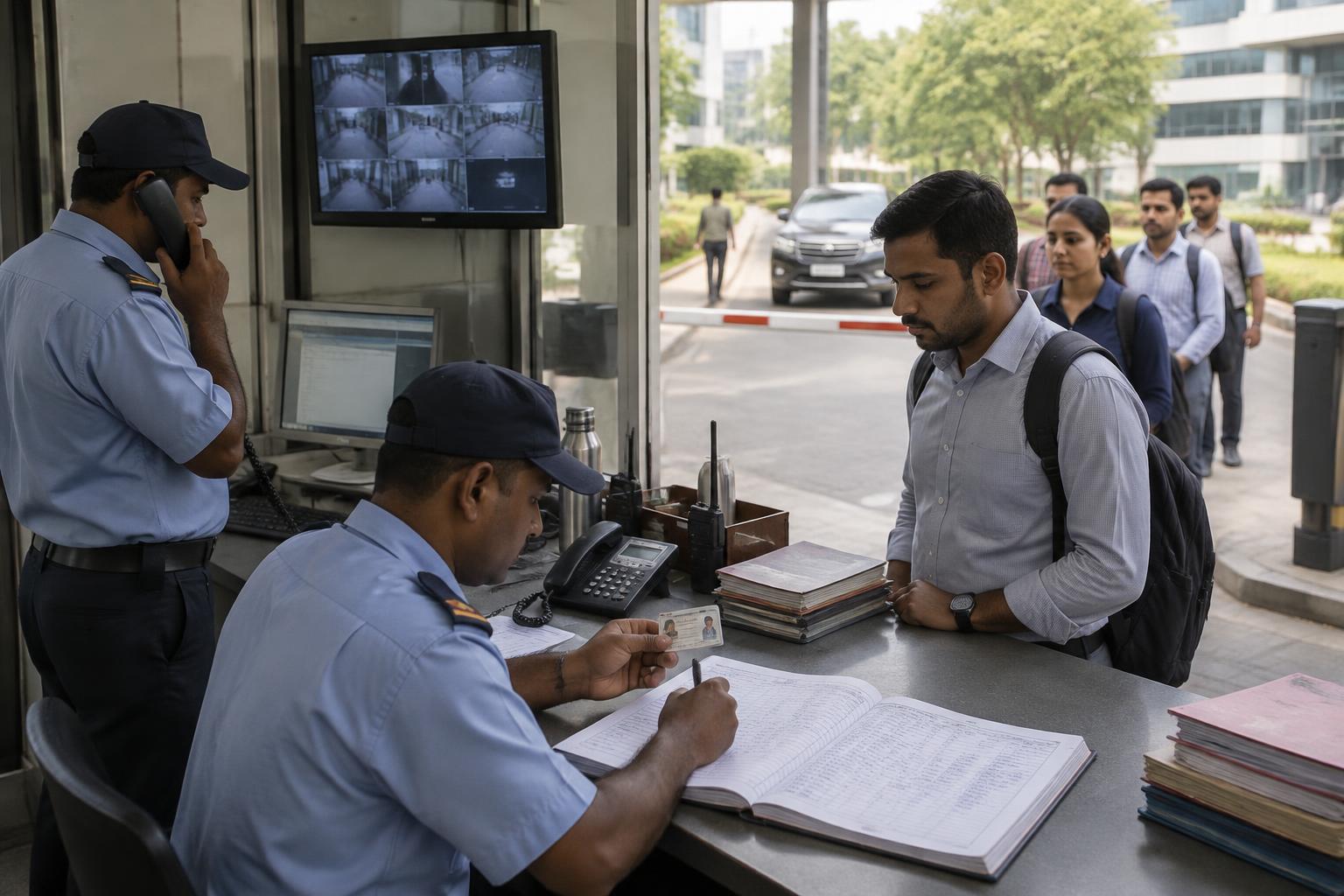
The existing gatepass operation ran on manual processes, physical registers and outdated software, connected to fragmented hardware.
The failure was not located in one screen. It was distributed across people, software, hardware and process — which is why fixing the interface alone would not have changed the operation.
What was happening
- Guards struggled with the existing system
- Visitor processing was slow
- Manual entry introduced errors
- Hardware failures could go unnoticed
- Emergency response was not streamlined
- Facility managers had no unified visibility
- Visitors queued and repeated their details
I redesigned the gate as an operational system — not just a check-in screen.
02
Context
The digital gatepass experience sits on top of physical security infrastructure. Every design decision had to survive hardware behaviour, shift patterns and exception handling.
Connected systems
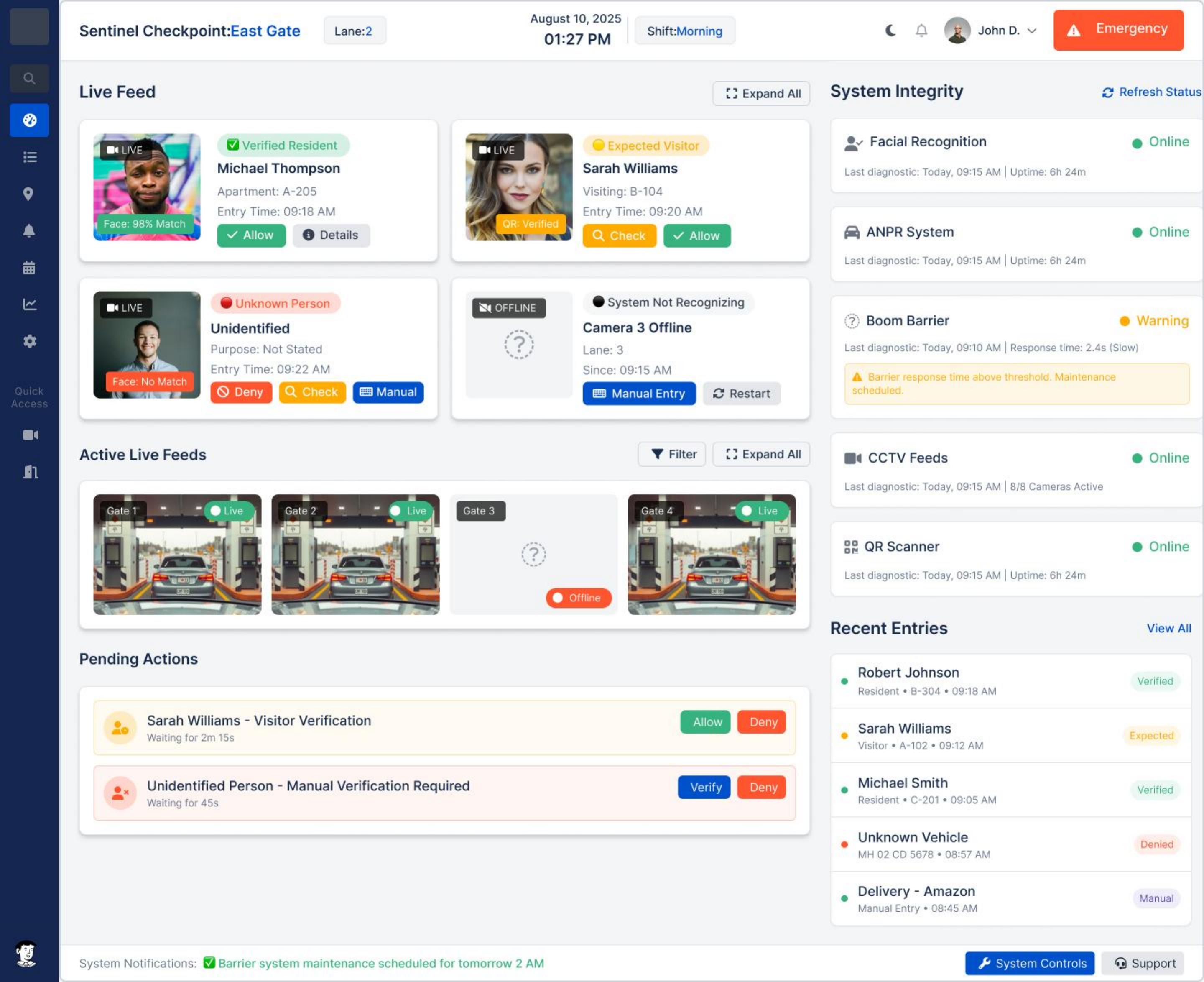
- Facial recognition
- ANPR
- Boom barriers
- CCTV
- QR scanning
- Gate / access systems
- Hardware monitoring
Existing workarounds
- Paper registers
- Phone calls
- Manual verification
- Local knowledge held by individual guards
03
Users & stakeholders
Ramesh Kumar
Senior Security Guard · 45
- Simple tasks under time pressure
- Clear status of gates and devices
- A fast, unambiguous emergency action
Facility Manager
Operations oversight
- Unified operational visibility
- Early awareness of hardware issues
- Confidence that the gate will not fail unnoticed
Visitor
High technology comfort
- Fast check-in
- Minimal repetition
- Clear instructions
The emotional layer
Interviews surfaced a recurring fear from the operations side: “What if the gate breaks?” The desired state was not speed for its own sake — it was confidence and control.
04
Key insights
From stakeholder and user research
Observed: guards were compensating for the system with paper and phone calls. Meant: the system did not match the pace of the gate. Opportunity: design for the frontline task first, reporting second.
Observed: hardware problems were discovered by their consequences. Meant: the operation was reactive by design. Opportunity: make device health a first-class part of the interface.
Observed: emergencies depended on individual judgement and memory. Meant: response quality varied by person. Opportunity: an explicit, always-reachable emergency workflow.
Research activities: stakeholder interviews, real user interviews, competitor analysis, affinity mapping, personas, empathy mapping, customer journey mapping, HMW statements and card sorting.
05
Experience structure
The gate as an operational system
- Entry
- Verification
- Decision
- Gate access
- Entry recorded
- Monitoring
- Exception handling
- Emergency response
Information architecture
- Visitor entry
- Vehicle entry
- Verification
- Manual entry
- Statistics
- Hardware status
- Performance analytics
- Emergency management
- System notifications
06
Design decisions
The problem
Guards could not tell what needed attention during a busy shift.
Explored
A — Show all operational data on one dense screen
Explored
B — Prioritise the current task and surface exceptions
Explored
C — Route everything through supervisor escalation
Decision
Prioritise the current task, with exceptions raised as clear status signals.
Why
The guard’s job at the gate is a sequence of short decisions. Density that helps a manager actively harms the frontline.
The problem
Hardware failures were discovered too late.
Explored
A — Keep hardware in a separate maintenance tool
Explored
B — Add a device-health view to the dashboard
Explored
C — Push proactive alerts into the operational workflow
Decision
Device health inside the dashboard, with proactive alerts routed to the manager.
Why
Detection had to reach the person who can act. System detects issue → manager receives alert → maintenance response.
The problem
Emergency handling varied between individuals.
Explored
A — Documented procedure only
Explored
B — A dedicated emergency mode in the product
Decision
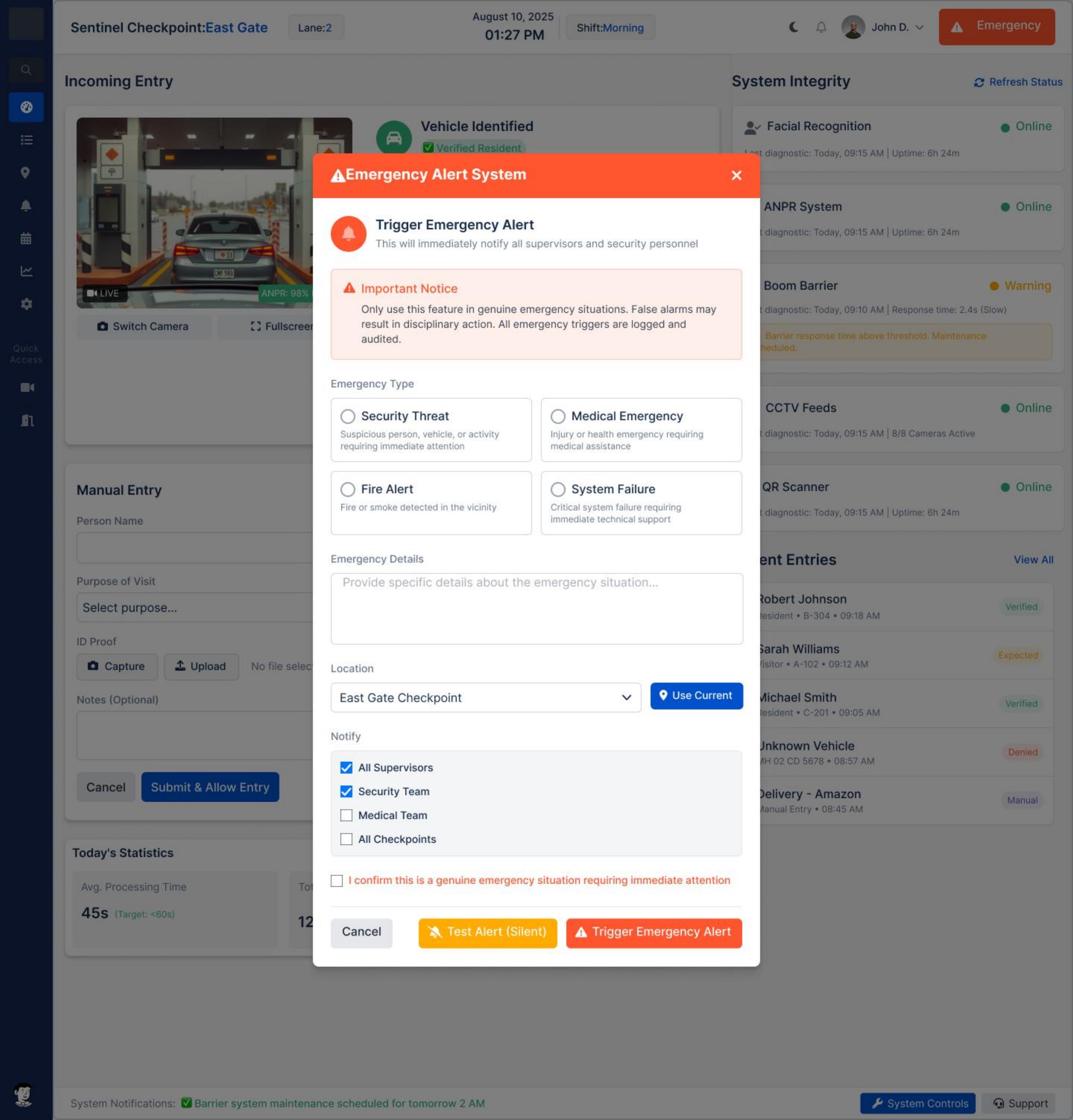
An explicit emergency workflow, reachable in one action from the guard application.
Why
In an emergency the interface should reduce choices, not present them.
07
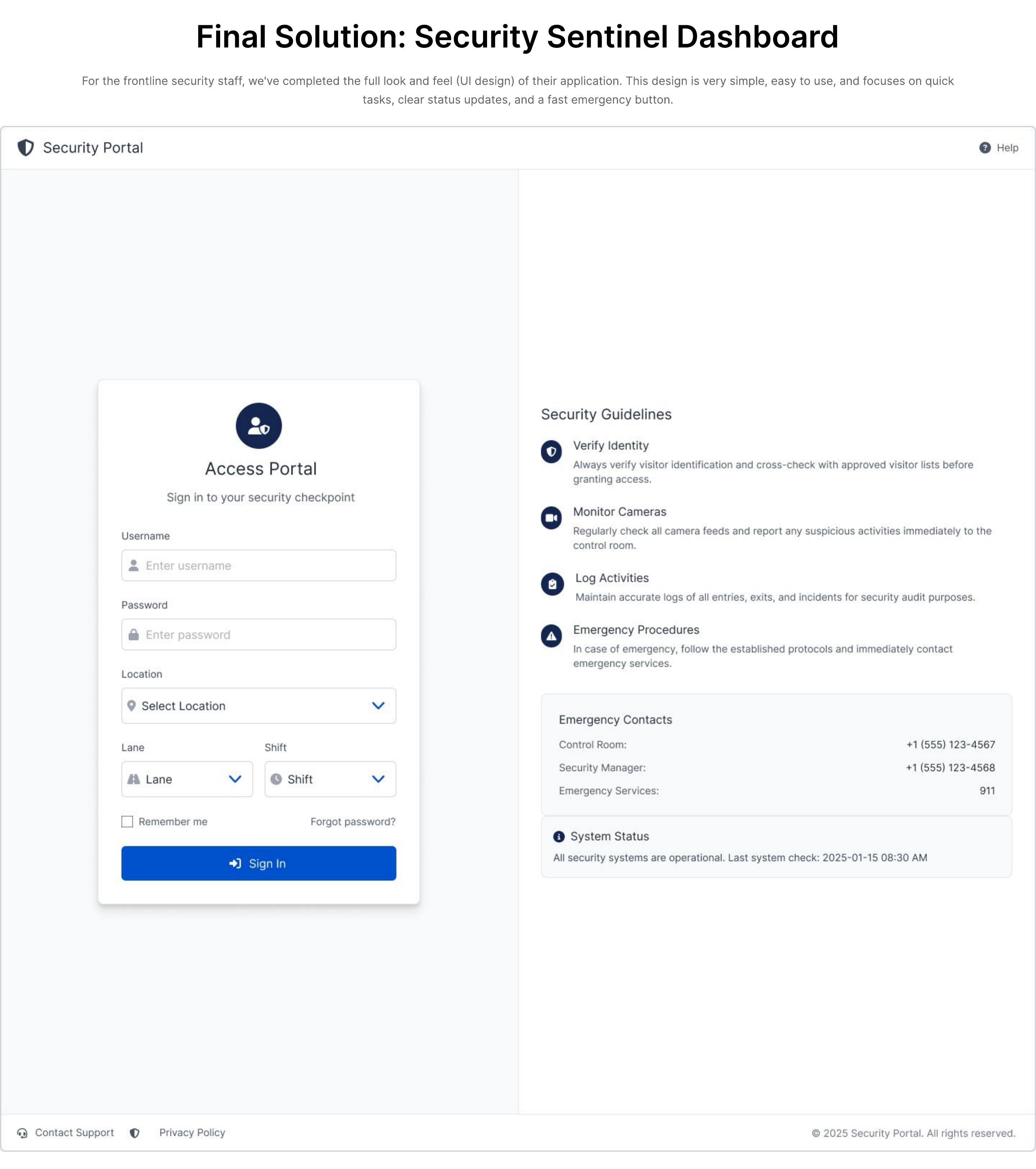
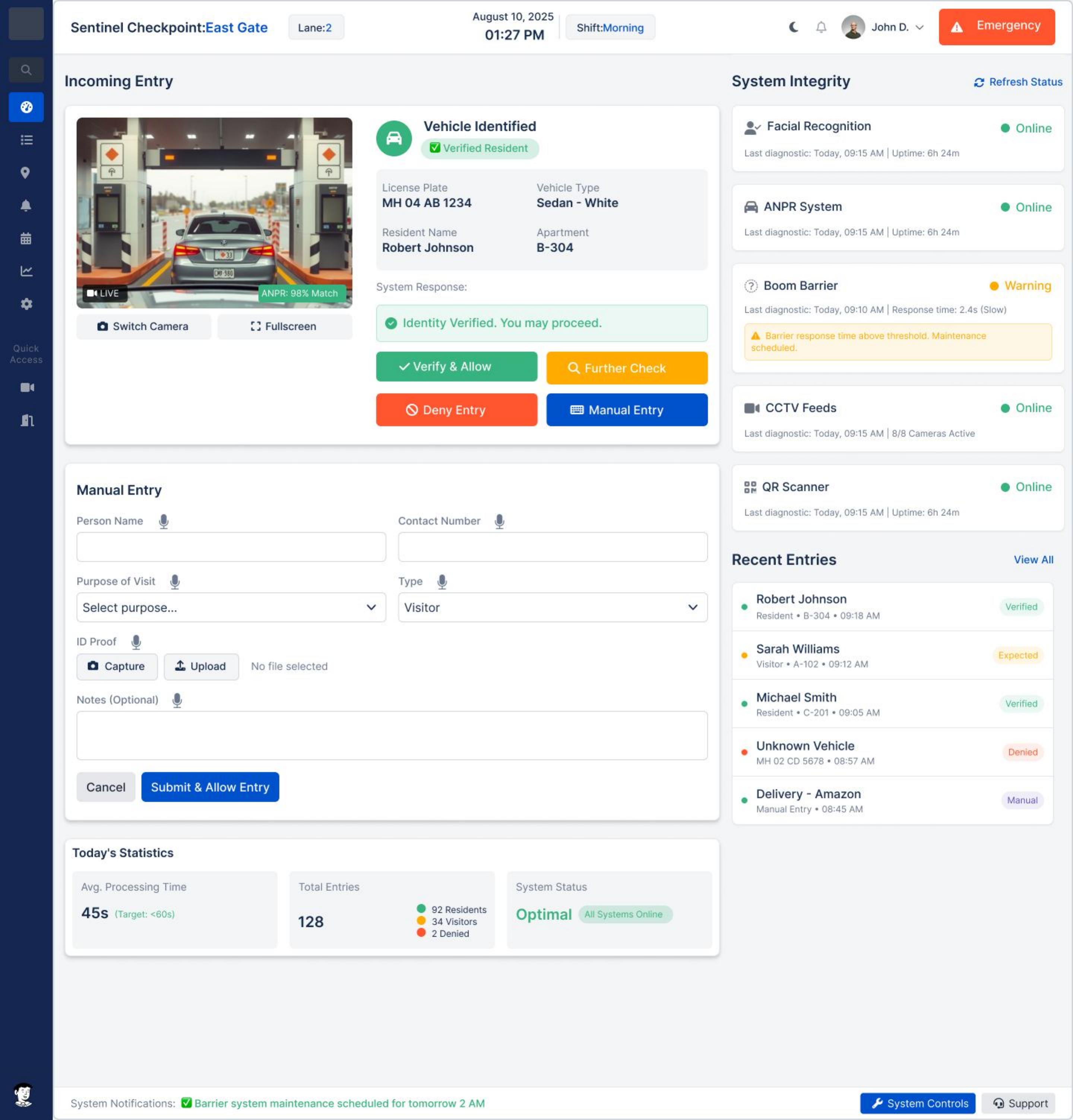
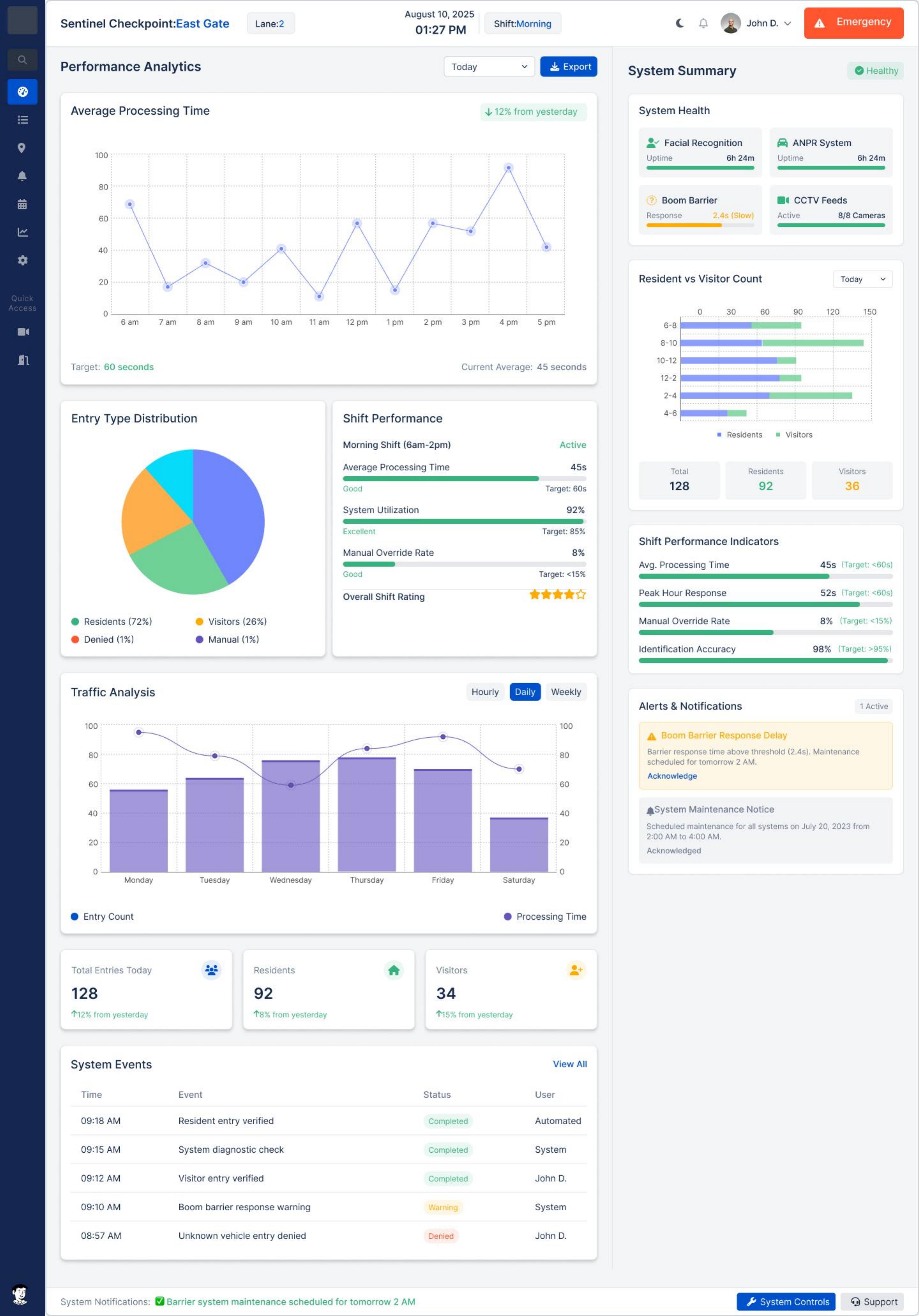
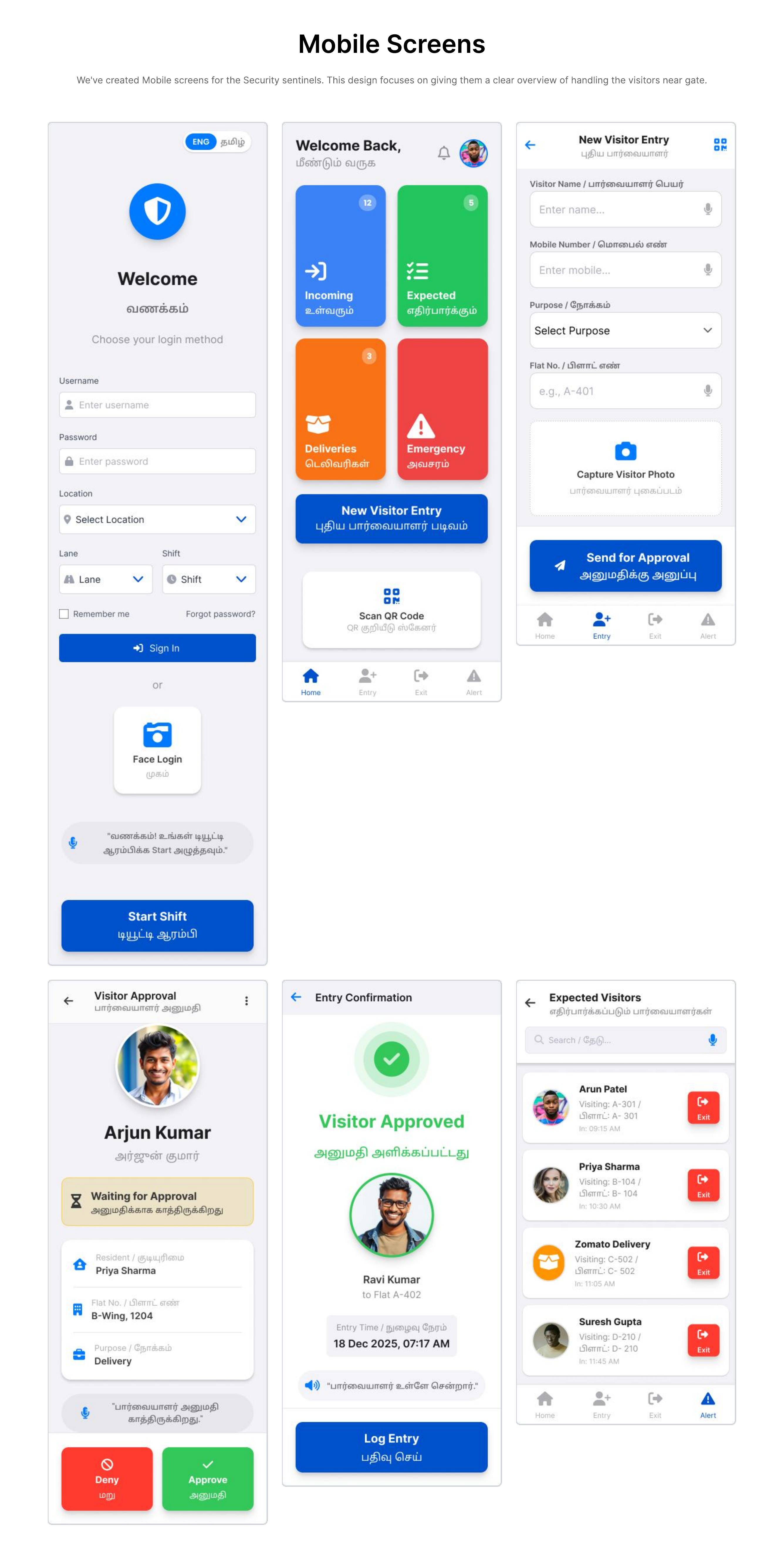
The solution
The final concept brought together
- Gate operations — resident, visitor and vehicle entry
- Verification and manual fallback
- Hardware and device health monitoring
- Operational statistics and performance analytics
- Emergency management
- System notifications and maintenance alerts
08
Validation
The design was evaluated through real user interviews, stakeholder feedback and observation of the live operational environment.
Live-system measurement informed the outcome; client-sensitive numerical figures are intentionally omitted.
09
Outcome
Before
- Fragmented
- Manual
- Unclear
- Reactive
- High effort
After
- Connected
- Simplified
- Clear
- Proactive
- Lower effort
Qualitative outcomes only. Numerical performance figures are client-sensitive and intentionally omitted.
Observed improvements
- Simplified guard workflows
- Faster check-in and verification
- Automated identification
- Hardware-status visibility
- Proactive maintenance awareness
- Centralised operational information
- Defined emergency-response workflows
- A better visitor journey
Reflection
What I learned
- 01The brief said “the gatepass software is slow”. The problem was that four systems and three roles had no shared picture. Reframing that was the highest-value work I did on the project.
- 02Designing alongside hardware changed how I think about states. Offline, degraded and failing are not edge cases at a gate — they are Tuesday.
- 03Frontline users do not want more information. Ramesh needed fewer decisions per interaction, not a richer dashboard.
- 04Interviewing guards taught me that fear is a design input. “What if the gate breaks?” shaped the proactive alerting more than any efficiency goal.
- 05Working across IT and Facility Management, I learned to bring decisions with trade-offs attached instead of options with preferences attached.
Case study summary
- Problem
- A gate operation fragmented across people, software, hardware and process
- My contribution
- Led UX strategy and research; owned the end-to-end design process and stakeholder communication
- Key decision
- Treat the gate as an operational system: frontline simplicity plus proactive hardware visibility
- Outcome
- Live operational system; client-sensitive figures intentionally omitted
- Main learning
- Reframing the problem was worth more than any screen in the project
Media I need from you
Upload order for this case study
Send them one at a time and I'll place each one exactly where it belongs. Start with Essential — the case study reads correctly once those are in.
Essential
- Case study hero image
- Main dashboard
- Guard application screen
- Visitor experience screen
- Before-state / original workflow
- Final workflow
- Hardware monitoring screen
- Emergency workflow
Important
- User journey
- Information architecture
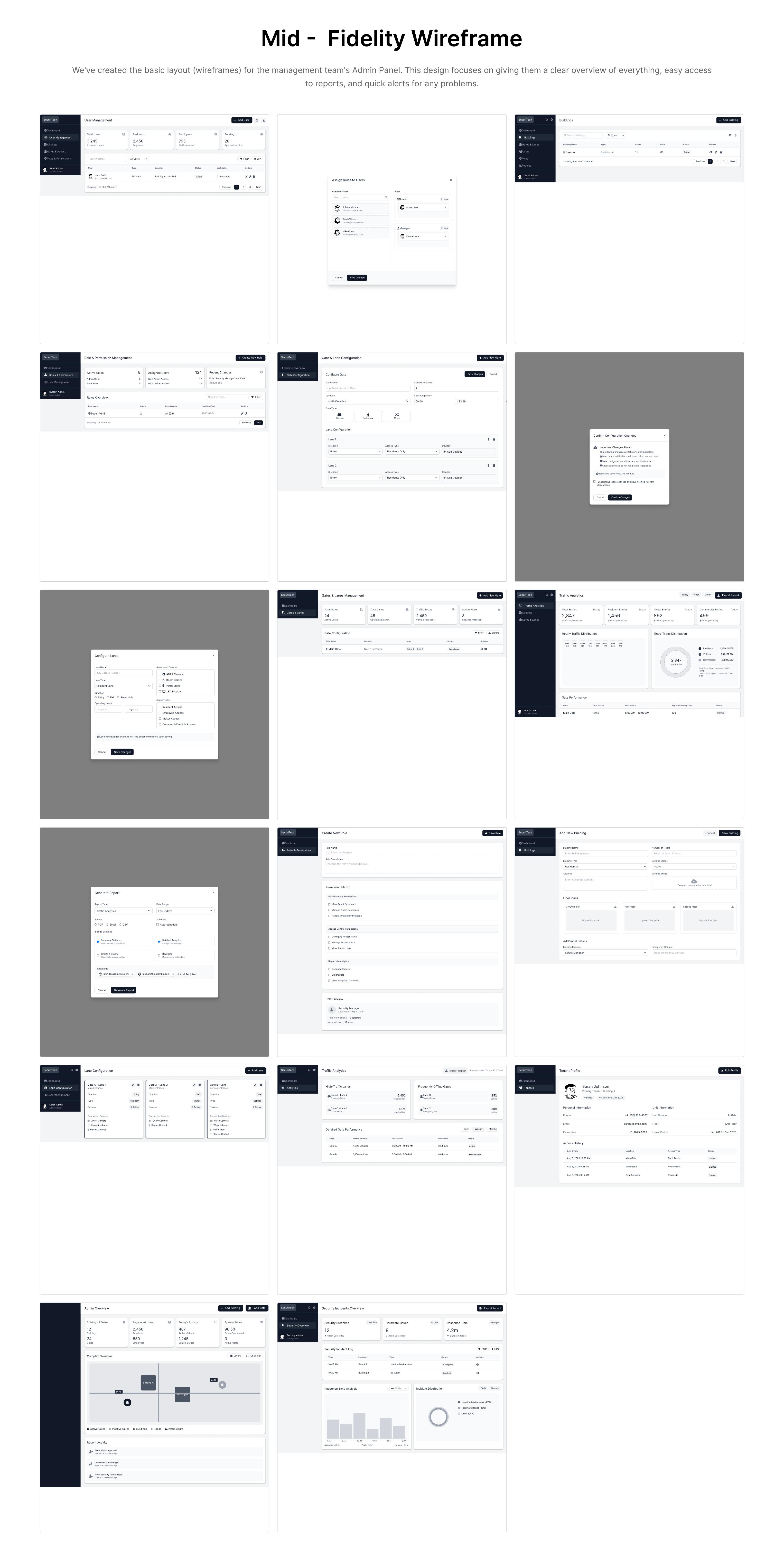
- Wireframes
- Design explorations
- Prototype recording
Optional
- Sketches
- Workshop photographs
- Physical environment photographs
- Behind-the-scenes images
- Case study video